









Intranet portals: Get organized and engage your employees



9 mins read
Disorganization is a problem in many workplaces. A survey of 1,000 knowledge workers found that a quarter of respondents spent more than two hours a day searching for information they needed to do their jobs.
The survey also revealed that many workers lost time due to switching between platforms, repeated interruptions, and inadvertently duplicating tasks.
So, how do you organize information, improve day-to-day processes, and alleviate common frustrations for employees? It’s easier than it sounds, when you invest in an intranet portal.
In this post, we’ll explain the key functions of an intranet portal, how it benefits employees, and what to look for when you’re shopping for a solution.
What is an intranet portal?
An intranet portal is a digital platform that facilitates communication, knowledge sharing, and file management. When it integrates with other platforms businesses are already using — such as project management software or CRM systems — employees can access information from those systems within the intranet portal.
How do intranet portals benefit companies and employees?
An intranet portal helps employees feel connected and makes it easier for them to find the resources they need. An employee intranet portal can:
Improve knowledge management
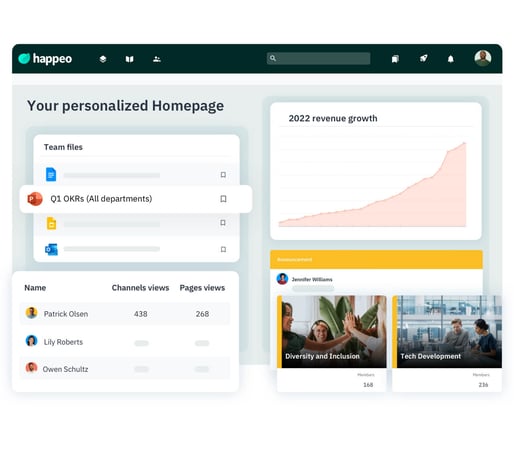
An intranet serves as a central repository for all files, so employees know exactly where to find documents and assets.
Personalize employee experiences
Legacy intranet systems offered little in the way of personalization, but modern social intranet platforms let employees customize their timelines to see only the information that’s most relevant to them.
Improve Internal Communications
An intranet portal improves all aspects of internal communications — from top-down messaging to team brainstorming.
Enable a user-generated knowledge base
With an intranet portal, employees can share knowledge across teams, providing greater transparency into everyone’s roles.
Streamline employee onboarding
Intranet portals help new hires quickly acclimate to their roles. All of the information they need is contained within one centralized platform, so there’s less risk of new hires feeling “lost” or overwhelmed.
Promote team collaboration
An intranet portal includes several features that promote team collaboration, such as shared calendars for scheduling meetings, video call support, and direct messaging.
Integrate with existing workspaces
Platforms that integrate with Google Workspace and Microsoft365 help employees find documents quickly, without needing to leave the intranet portal.
Features to look for in a company intranet portal
Obviously, an intranet platform offers many benefits. But each platform has different features. (For example, Happeo integrates with both Google Workspace and Microsoft365, whereas SharePoint lacks a Google Workspace integration).
As you look for an intranet portal for your business, keep an eye out for the following features:
Knowledge sharing
Knowledge sharing — or document sharing — is one of the most essential features in an intranet portal. However, if the platform doesn’t integrate with your existing workspaces, employees might have to leave the portal to find files, which has a negative impact on productivity.
Look for an intranet portal that integrates with your other production environments and essential business software.
Employee directory
An employee directory is a useful feature, and even more so if it helps employees match names with faces. At a time when many employees are working remotely, a robust employee directory with “people pages” — digital cards that include an employee’s photo, title, department, groups, and contact info — can help foster connection.
Universal Search
Integration with other platforms is beneficial, but an intranet platform should also include a universal search feature that lets employees find files that might be outside of the portal. Look for a search function that fulfills this need and also searches across calendars, user profiles, and social intranet posts.
Happeo’s Federated Search feature also enables users to find content from third-party platforms in the same search bar. This prevents employees from having to click between disparate systems looking for information.
Social collaboration
It’s no secret that companies are increasingly struggling to retain talent, especially when remote work opportunities are abundant. An intranet portal with social components could help engage employees and improve morale, which in turn could reduce turnover.
Look for an intranet platform that lets employees share, like, and comment on each other’s posts. Workers still need “water-cooler conversations,” even if they’re virtual.
Content lifecycle management
Intranet portals that include content lifecycle management features ensure that employees aren’t working with outdated content. This functionality is especially useful for HR teams that need to update and sunset policies on a regular basis.
User-friendly content management
An intranet portal functions as an internal CMS, so look at whether administrators can easily format and publish content without the need for development or design skills.
Ideally, you’ll want a platform that includes templates for intranet pages, a customizable login page, and optional upgrades for a completely branded experience.
Mobile functionality
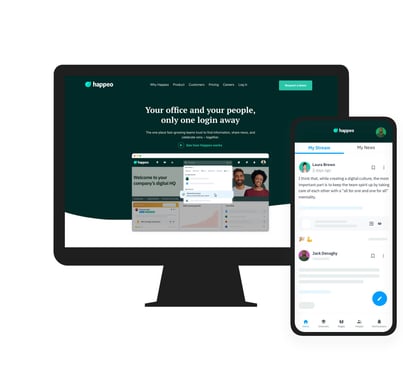
An intranet portal with a mobile app helps employees stay connected, even when they’re away from their desks. App users can configure their push notifications and ensure they never miss out on important announcements or urgent requests.
Usage Analytics
An intranet portal is an investment, so you want to be sure employees are actually using it. Built-in usage Analytics can help you see whether employees are engaging with the platform, what types of content they’re most interested in, and who your top “thought leaders” are.
Security
When you’re exchanging confidential information within your intranet portal, you’ll need to be sure it’s protected from unauthorized access. Look for a platform with ISO 27001 certification, SAML, and single sign-on capabilities.
How to roll out an intranet portal
By now, you may be thinking, “An intranet portal sounds great — but how long will it take to implement?” Good question!
Some intranet portals can take upwards of a year to launch, but 54% of Happeo’s customers launch within 90 days, and 87% launch within six months. That’s because Happeo recommends a specific onboarding package based on the size of a customer’s business, then we ask a select group of your stakeholders to begin using the platform before the full rollout.
During and after onboarding, you can count on Happeo’s dedicated support team to answer your questions, show you how to use features, and check in with you regularly to make sure you’re getting the best return on your investment.
Create an intranet portal your staff will love
If you’re ready to get organized, work more efficiently, and engage your employees, it’s time you tried Happeo. Take a closer look at what Happeo can do. And when you’re ready, schedule your free demo!
What is an intranet portal and how does it help workers find information?An intranet portal is a centralized digital platform designed to facilitate communication, knowledge sharing, and file management within an organisation. By integrating with existing business platforms, such as project management software, CRM systems, and productivity suites like Google Workspace or Microsoft 365, it allows employees to access diverse systems and information from a single, unified interface.
This integration directly addresses the common workplace issue of disorganisation, where knowledge workers can waste hours every day searching for necessary resources. With an intranet portal serving as a central repository for files, employees know exactly where to find documents, reducing the need to switch between different platforms or inadvertently duplicate tasks. It streamlines daily processes and alleviates frustration by making resources highly accessible.
Furthermore, look for portals that feature a universal search function. This tool enables users to search across calendars, user profiles, social posts, and even third-party platforms simultaneously. Having this single search bar prevents employees from clicking through disparate systems, helping them find files quickly and keep their focus on productive tasks.
What key features should businesses look for when choosing an intranet portal?When shopping for an intranet portal, businesses should focus on features that enhance connectivity, content management, and data security. A vital feature is a robust employee directory complete with digital “people pages” that display photos, roles, departments, and contact details, which helps remote teams stay connected. Social collaboration tools, such as the ability to share, like, and comment on posts, are also crucial for maintaining employee morale and virtual water-cooler conversations.
Content management should be highly user-friendly, functioning as an internal CMS where administrators can format and publish content using templates without needing design or development skills. Additionally, content lifecycle management features are important to ensure out-of-date policies are updated or sunsetted. Mobile functionality through a dedicated app with configurable push notifications is also recommended so deskless or remote employees can stay updated on urgent announcements.
Finally, businesses must prioritise security and return on investment. Look for security credentials like ISO 27001 certification, SAML, and single sign-on capabilities to protect confidential information. Built-in usage analytics are also necessary, as they allow organisations to measure employee engagement, find popular content, and identify top thought leaders within the company.
How long does it typically take to roll out a new intranet portal?The timeline for rolling out an intranet portal can vary significantly depending on the platform you choose. While some legacy intranet portals on the market can take upwards of a year to fully launch, modern and agile platforms like Happeo are designed for a much faster implementation. Statistics show that 54% of Happeo customers successfully launch their portal within 90 days, and 87% complete their rollout within six months.
This rapid deployment is achieved through a structured onboarding process. A specific onboarding package is recommended based on the unique size and needs of your business. To ensure a smooth transition, a selected group of key stakeholders is invited to begin using the platform first, allowing for testing and refinement before initiating the full, company-wide rollout.
Support throughout this implementation period is also a major factor in speed and success. With dedicated support teams on hand to answer questions, guide users through features, and conduct regular check-ins, companies can navigate the transition smoothly and ensure they get the best possible return on their investment during and after onboarding.
