









Why Notion Isn't Working as Your Intranet…and What a Real One Looks Like




Hanna Taylor
8 mins read
Notion is a genuinely great tool. For managing projects, building team wikis, and keeping individual teams organized, it's hard to beat. But if you've found yourself wondering why your company knowledge feels scattered, why important announcements get missed, or why nobody seems to know where to find anything, the tool isn't the problem; the category is.
Notion was built for team-level productivity. An intranet operates at a different layer entirely: company-wide communication, knowledge governance, and making sure hundreds of people working remotely feel connected to the same organization. The workarounds required to make Notion function at that layer are exactly what's creating the friction you're feeling today.
Here's a look at where those gaps show up in practice.
1. Communications That Actually Reach People
The Notion reality: In Notion, communicating to the company means publishing a page and hoping people find it. There's no way to push an announcement, no way to target an update to a specific team or location, and no way to know who's actually seen something important.
For hybrid/remote teams, this is a serious problem. Without a physical office to absorb information passively, like a screen in the kitchen, or a conversation overheard in the corridor, digital communication has to work harder. Notion doesn't.
For teams distributed across different offices, sites, or entirely different working environments (whether that's global offices in different time zones, field staff who are rarely at a desk, or teachers spread across multiple school buildings), information is often siloed, and those teams end up working from different versions of the truth. Keeping everyone genuinely aligned requires more than a shared wiki; it requires a communication layer that actively brings the right information to the right people, regardless of where they sit or how they work.
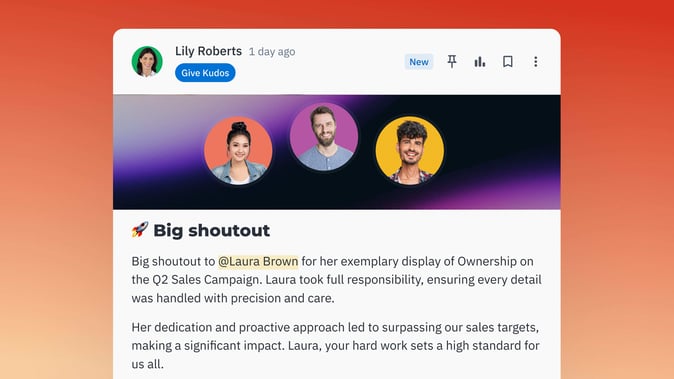
What a purpose-built intranet does: Happeo has a personalized homepage that every employee lands on when they open the platform. It surfaces company-wide updates alongside content that's relevant to that person: their team, their department, their location… automatically, without anyone having to manually curate it.
A new joiner sees onboarding resources and company-wide news. Someone in HR sees the same company update alongside HR-specific content. A field technician sees what's relevant to their region and role. Same homepage, intelligently personalized.
Channels let internal comms, team leads, and SMEs publish targeted announcements to specific audiences, with engagement tools like reactions, comments, and polls, so communication becomes two-way rather than a broadcast into the void.
2. A Knowledge Base That Manages Itself
The Notion reality: Notion's knowledge base is entirely passive. Content is created, and then it sits until someone notices it's wrong, which often doesn't happen. There's no native way to set review cycles, notify owners when content is going stale, or understand what employees are searching for and not finding. Getting any meaningful view of content freshness requires third-party tools on top of Notion.
The result is inevitable: over time, your wiki becomes a graveyard of outdated policies, stale guides, and pages nobody is sure they can trust. For a remote organization where the intranet is the source of truth, that's a real operational risk.
What a purpose-built intranet does: Happeo approaches knowledge management as an active, ongoing system, not a static repository.
Content lifecycle management means pages have owners and review cycles. When content is approaching its review date, the owner is automatically notified. Nothing goes stale silently.
User-reported content means that even before a review cycle triggers, employees reading a page can flag it as outdated or inaccurate directly. The feedback loop is immediate, and it comes from the people closest to the information.
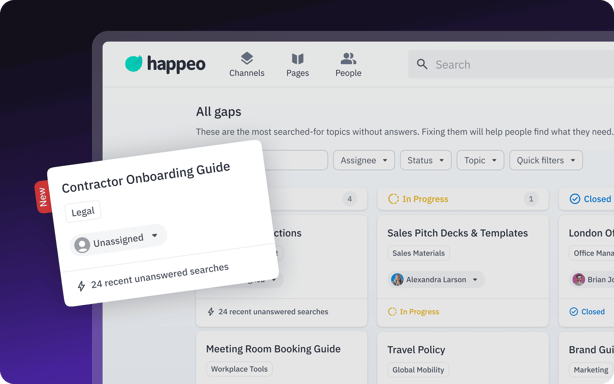
AI-powered knowledge gap detection takes it a step further: when employees search for something and the platform can't return a confident answer, it automatically identifies that as a gap, surfaces it to the relevant owner, and prompts content creation. Instead of waiting for someone to notice something is missing, the system tells you. This is the difference between a knowledge base that slowly decays and one that gets smarter over time.
3. AI Search That Works Across Your Actual Tool Stack
The Notion reality: Notion AI only searches Notion. For a team whose work lives across Google Drive, Gmail, and Slack, that means the AI is only ever returning a partial picture. The answer to "what's our current parental leave policy?" might be in a Google Doc, not a Notion page, and Notion AI won't find it.
Beyond that, meaningful AI in Notion now requires the Business plan, the only tier where AI is fully included. For teams not already on that plan, the jump is significant.
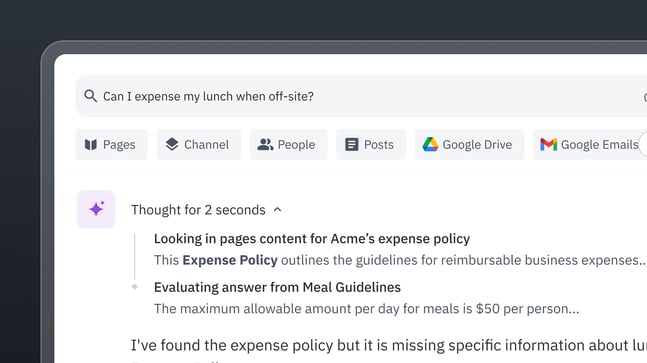
What a purpose-built intranet does: For organizations that run on Google Workspace and Slack, Happeo's federated AI search is included in the proposal. From a single search bar, employees can ask a natural-language question and receive a synthesized answer drawn from Happeo pages, Google Drive, Gmail, and Slack, with source citations so they know where the answer came from.
The AI writing assistant is also included, helping content owners create and update pages faster.
For a remote team where "I'll just ask someone" isn't always an option, having a search that actually works across everything is the difference between finding an answer in thirty seconds and spending twenty minutes hunting through tabs.
4. Permissions and Provisioning That Fit How You Already Work
The Notion reality: Notion's permissions system requires rebuilding access controls from scratch within the platform. User provisioning is manual on anything below Enterprise, meaning no automatic onboarding or offboarding of access when people join or leave. Audit logs and SCIM provisioning are Enterprise-only features, at custom pricing.
What a purpose-built intranet does: Happeo connects to wherever your organization already manages its people and groups, so there's no parallel infrastructure to build or maintain.
Provisioning is supported from Google Workspace, Microsoft, Okta, and key HR systems, including Workday, BambooHR, Rippling, and Deel, among many more. Whichever system you use, Happeo syncs in the group structure that comes with it (Google Groups, Okta Groups, and so on), so the audiences you've already defined for your organization carry straight through into Happeo. Targeting a page or Channel to the right people means selecting a group you already manage, not creating a new one.
For SSO, Google and Microsoft are supported out of the box, and any SAML 2.0 provider works too, so whatever your organization uses today, it fits.
For documents, Happeo works with Google Drive, Microsoft OneDrive/SharePoint, and Box. Files stay where they already live, without uploading to a separate intranet repository and creating a new document silo. Pages surface and embed files directly from the cloud-based systems your teams already use, keeping everything in sync without duplicating anything.
5. A People Directory That Builds Itself
The Notion reality: Notion has no native people directory. Building one means creating and maintaining a database manually, which quickly becomes out of date, especially in a growing or distributed organization, where knowing who to contact for what is genuinely important.
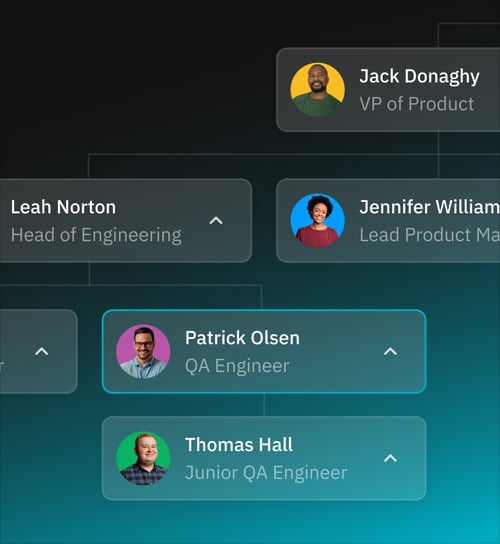
What a purpose-built intranet does: Happeo's people directory is automatically built from user attributes in your existing provisioning source, whether that's Google Workspace, Microsoft, Okta, or an HR tool like Workday or BambooHR. For most organizations, those attributes are already well maintained, either directly or through a connected HR system. The org chart derives itself from the manager field and department hierarchy, so there's no setup required, and it stays current as your team changes.
Employees get full profile pages. Pages can include user card widgets to highlight key subject matter experts or points of contact, helping surface who owns what across a distributed organization. And when someone runs a search, the platform can recommend relevant colleagues alongside content results.
Knowing who to go to is half the battle. This makes it automatic.
6. Analytics That Tell You Something Useful
The Notion reality: Basic page views and top viewers are available on lower Notion plans. Meaningful workspace analytics, the kind that tell you whether your content strategy is working, which policies aren't being read, and where engagement is dropping, are locked to Enterprise.
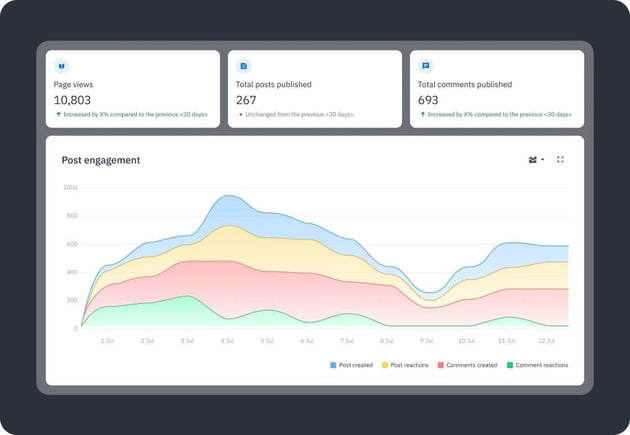
What a purpose-built intranet does: Happeo includes content analytics dashboards as standard, showing readership trends, engagement, and content performance. Combined with lifecycle management and user-reported feedback, internal comms and knowledge owners have an active picture of what's working, not just a view count.
7. Powering Your AI Tools With Trusted Knowledge
The Notion reality: Notion doesn't currently offer a way to connect its content as a governed knowledge source to external AI tools. And without native lifecycle management or gap detection, the underlying content would need to be trusted before it could usefully power anything else.
What a purpose-built intranet does: Happeo offers an MCP (Model Context Protocol) integration, which means you can connect Happeo directly to AI tools like Claude or ChatGPT. When your team asks those tools a question, they draw on Happeo as a verified, governed source of knowledge rather than guessing or pulling from wherever they can reach. The investment you make in keeping your Happeo knowledge base accurate, current, and complete pays dividends across every AI tool in your organization. Garbage in, garbage out, and Happeo is built to make sure what goes in is worth trusting.
The Bottom Line
Notion is a powerful, flexible tool, and for many use cases it's a genuinely great choice. But when an organization needs a single, trusted source of knowledge, a foundation that stays accurate, surfaces what's missing, reaches people wherever they are, and powers the AI tools your teams rely on, that's a different problem, and it needs a different kind of tool.
That's what Happeo is built for. And in a world where your AI tools are only as good as the knowledge behind them, getting that foundation right has never mattered more.
Happeo: The intranet that keeps your teams informed, aligned, and productive.
Ready to learn more about Happeo? Book a consultation with us today.
